 Owner Help Center
VIDEO
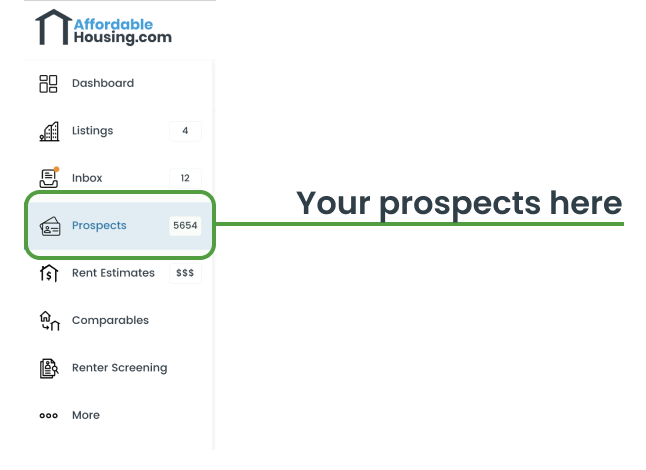
Prospects are prospective renters for your property. These renters are actively searching for properties like yours, making them valuable leads.
On AffordableHousing.com, Prospects are part of QuikMatch. Our QuikMatch algorithm will match these prospective renters to your active listings or waiting list listings.
Prospects can be filtered by several characteristics, including:
Typically, Prospects have not yet applied to your rental properties. Many Prospects may not be aware of your listing and need to be contacted directly. You can use your Prospect credits to reach out via email and SMS though your AffordableHousing.com dashboard.
Free owners have 1 Prospect credit and Premium owners get 600+ Prospect credits per year. Upgrade today to get more Prospect credits and proactively reach out to renters.
VIDEO
QuikMatch helps connect your listings with renters who may be a good fit based on their housing preferences and activity on AffordableHousing.com.
When your listing is active or accepting applications for a waiting list, QuikMatch can identify renters whose preferences align with your property, including factors such as:
You can browse and filter Prospects directly within your dashboard and contact them individually or in bulk through the platform.
Free owners receive 1 Prospect credit to try QuikMatch. Premium members receive 600+ Prospect credits per year. For more Prospect credits, upgrade to a Premium membership.
Both Prospects and Applicants are renters, but they are at different stages of the rental process. Understanding the difference helps you focus on the right leads at the right time.
A Prospect is a renter that may be a good match for your rental property but has not yet applied.
How You Find Them:
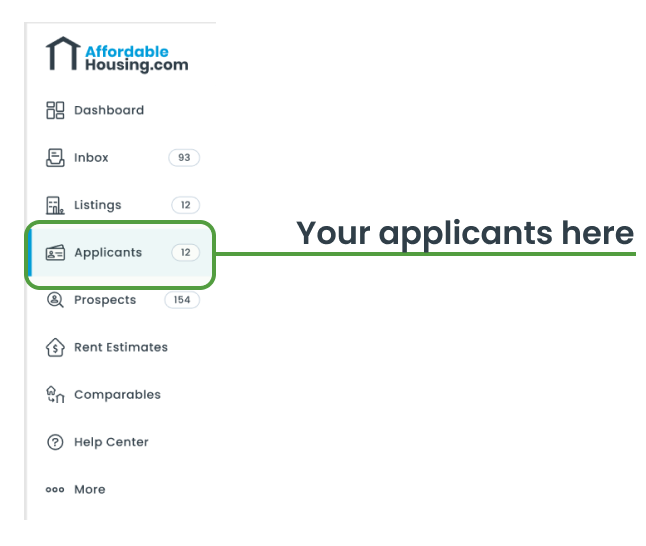
An Applicant is a renter who has submitted a pre-application for your property listing.
What You’ll See in an Application:
Applicants are serious leads—they’ve already taken the step to apply! Respond to Applicants ASAP to fill your vacancies fast.
QuikMatch immediately matches Prospects to your active listings as soon as you list a property. We’ll deliver a Prospects summary to your inbox regularly, as soon as there are qualified Prospects to report. Remember, these are qualified leads who are actively looking to rent your property. Check your inbox regularly and contact Prospects as soon as possible.
To generate a template, navigate to the "Prospects" tab on the dashboard. From the list, choose at least one prospect and click on Compose Email. Within the modal, scroll to the bottom where you'll find a checkbox labeled Save Template. Assign a name to your template and the next time you select Prospects and compose an email, the template will be available for use.
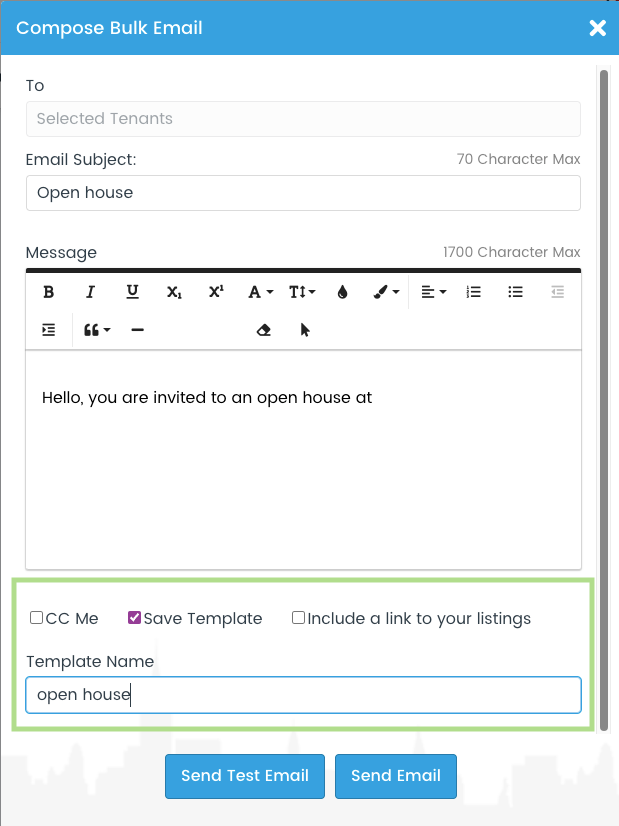
Note: This feature is available to Premium Members only. Click here to upgrade.
We capture and analyze hundreds of data points for each QuikMatch Prospect in real-time. We look at their search and preference data for location, property type, rent amount, number of bedrooms, and other factors to create a transparent Prospect profile. We like to call this profile "Family DNA." We then match the Prospect's "DNA" to your active listings and send you matching leads. See for yourself—Go to your “Prospects” tab in the dashboard and sort by Best Match to see prospective renters who are looking for properties like yours and more likely to respond to your inquiry.
VIDEO
QuikMatch makes it easy for you to proactively connect with renters who are the best fit for your property. Here’s how to get started:
Free members have 1 free credit to contact Prospects via QuikMatch. If you want more Prospect and Prospect contact credits, upgrade to Premium to get 500+ Prospect credits each year.
No. While QuikMatch is the largest database of Section 8 Prospects in the country, it also includes market-rate renters. You can find any type of renter in QuikMatch.
VIDEO
To review analytics for your Prospects and Applicants on AffordableHousing.com, follow these steps:
These tools help you assess whether a Prospect or Applicant is a good fit for your listing, enabling informed decisions for your property.
Renter analytics is a Premium feature. Upgrade today to access renter analytics and Prospects.

